





















































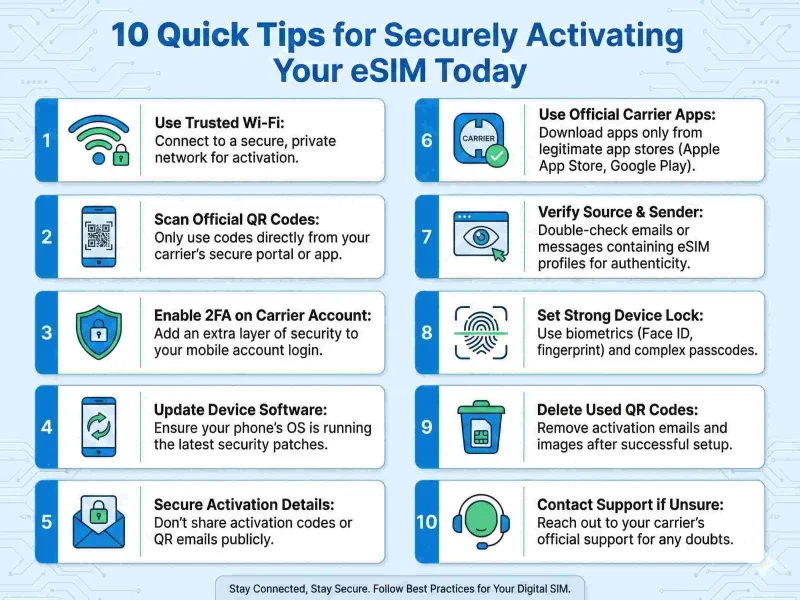
Unlock the full potential of your mobile device with our 10 quick tips for securely activating your eSIM today. Stay connected, hassle-free!
Understanding eSIM Technology
The advent of eSIM technology has revolutionized the way we connect to mobile networks. Unlike traditional SIM cards, eSIM (embedded SIM) is a digital SIM that is built into your device, eliminating the need for a physical card. This technology allows you to switch carriers, plans, or profiles with just a few clicks, providing unparalleled convenience and flexibility. The embedded nature of eSIM means that it cannot be lost or damaged, a common issue with physical SIM cards. Moreover, eSIM can store multiple carrier profiles, making it a fantastic option for frequent travelers who need to switch networks often.
eSIM technology operates on the same principles as traditional SIM cards but with added advantages. It uses remote provisioning, which means that your carrier can send you a profile over the air, and you can activate it without the need for mailing a physical SIM card. This not only speeds up the process but also reduces the environmental impact associated with producing and shipping plastic SIM cards. Moreover, since eSIMs are built into the device, they free up space that can be utilized for other components, leading to sleeker, more efficient device designs.
The security aspect of eSIM technology is also noteworthy. Traditional SIM cards can be physically stolen or cloned, posing a significant security risk. eSIMs, however, are embedded within the device and are far more difficult to tamper with. They support advanced encryption standards, making it harder for malicious actors to intercept or manipulate your data. Additionally, eSIM technology allows for secure profile management, ensuring that only authorized profiles can be activated on your device.
Benefits of Using an eSIM
The benefits of using an eSIM go beyond just convenience and security. One of the most significant advantages is the ability to manage multiple profiles on a single device. This feature is particularly beneficial for people who travel frequently or those who need to separate personal and business lines. With eSIM, you can switch between different carrier profiles without the hassle of swapping SIM cards, making it easier to manage your connectivity needs from one device.
Another key benefit of eSIM technology is its contribution to a greener planet. By eliminating the need for physical SIM cards, eSIM reduces the plastic waste associated with the production and disposal of traditional SIM cards. Additionally, the process of shipping physical SIM cards, which involves packaging and transportation, also has a carbon footprint. eSIM technology minimizes these environmental impacts, making it a more sustainable choice for mobile connectivity.
eSIM also offers a more streamlined user experience. The activation process is quick and straightforward, often requiring just scanning a QR code provided by your carrier. This ease of use means that you can get connected faster, without the need to wait for a physical SIM card to arrive in the mail. Furthermore, the ability to switch carriers or plans on the fly provides a level of flexibility that is unmatched by traditional SIM cards. This makes eSIM an ideal solution for anyone looking to optimize their mobile connectivity effortlessly.
Preparing for eSIM Activation
Before diving into the activation process, it’s crucial to prepare adequately to ensure a smooth transition to using an eSIM. Start by checking if your device supports eSIM technology. Most modern smartphones, tablets, and smartwatches are eSIM compatible, but it's always good to verify this information through the manufacturer's website or user manual. Knowing your device's compatibility will save you from unnecessary hassles down the line.
Next, ensure that your current carrier supports eSIM technology. While many major carriers have adopted eSIM, some smaller or regional providers may not yet offer this service. It's essential to contact your carrier and confirm their eSIM support, as well as any specific requirements they may have for activation. This may include updating your device's software to the latest version or performing specific steps to prepare your account for eSIM activation.
Gather all the necessary information and materials before starting the activation process. This includes your carrier account details, the QR code or activation code provided by your carrier, and a stable internet connection. Having everything at hand will make the activation process smoother and quicker. Additionally, ensure that you back up your device's data before making any changes. While the risk of data loss during eSIM activation is minimal, it's always better to be safe than sorry.
Choosing a Reliable Carrier
Selecting a reliable carrier is a critical step in ensuring a smooth and secure eSIM activation. Not all carriers are created equal, and the quality of service can vary significantly. Start by researching carriers that offer eSIM support and compare their plans, coverage, and customer reviews. Reliable carriers will have transparent information about their eSIM services and should be able to provide clear guidance on the activation process.
Consider the coverage and network quality of the carriers you are evaluating. A carrier with poor network coverage can lead to dropped calls, slow internet speeds, and overall poor connectivity, defeating the purpose of upgrading to an eSIM. Look for carriers with robust network infrastructure and widespread coverage in the areas where you spend most of your time. Online forums, customer reviews, and coverage maps can provide valuable insights into the real-world performance of different carriers.
Customer support is another crucial factor to consider when choosing a carrier for your eSIM. A reliable carrier will offer responsive and knowledgeable customer support to assist you with any issues that may arise during or after the activation process. Look for carriers that provide multiple channels for support, such as phone, email, and live chat. Having access to prompt and effective customer service can make a significant difference in your overall experience with eSIM activation and usage.
Step-by-Step Guide to Activating Your eSIM
Activating your eSIM can be a straightforward process if you follow the right steps. Here is a step-by-step guide to help you through the activation process:
1. Check Device Compatibility: Ensure that your device supports eSIM technology. Most modern smartphones, tablets, and smartwatches are compatible, but it's always good to double-check.
2. Update Your Device: Make sure your device's software is up to date. Some carriers may require the latest software version for eSIM activation.
3. Contact Your Carrier: Reach out to your carrier to request an eSIM activation. They will provide you with a QR code or an activation code.
4. Access Settings: Go to the settings menu on your device. The exact steps may vary depending on your device, but you will generally find the eSIM option under "Cellular" or "Network" settings.
5. Scan QR Code or Enter Activation Code: Follow the on-screen instructions to scan the QR code or enter the activation code provided by your carrier. This will download the eSIM profile to your device.
6. Activate eSIM: Once the profile is downloaded, you will need to activate it. This usually involves selecting the eSIM profile and confirming the activation.
7. Test Connectivity: After activation, test your device to ensure that it is connected to the network. Make a test call, send a text message, and browse the internet to verify that everything is working correctly.
By following these steps, you can activate your eSIM quickly and securely. The process may vary slightly depending on your device and carrier, so always refer to the specific instructions provided by your carrier for the best results.
Ensuring Device Compatibility
Ensuring your device is compatible with eSIM technology is a crucial step in the activation process. Most modern smartphones, including the latest models from Apple, Samsung, Google, and Huawei, support eSIM technology. However, not all devices are created equal, and some older models or budget smartphones may not include this feature. Always check the specifications of your device on the manufacturer’s website or consult the user manual to confirm eSIM support.
Compatibility is not only about hardware but also software. Ensure that your device's operating system is up to date. Software updates often include important security patches and feature enhancements that are necessary for the proper functioning of eSIM. Both iOS and Android platforms regularly release updates that may affect eSIM functionality, so keeping your device updated is essential for a smooth activation process.
Carrier compatibility is another critical factor. Even if your device supports eSIM, it must also be compatible with the carrier's network. Some carriers have specific requirements or limitations regarding which devices they support for eSIM activation. Contact your carrier to confirm that your device is compatible with their eSIM services. This step can save you from potential headaches and ensure a seamless activation experience.
Security Measures for eSIM Activation
Security is a top priority when activating your eSIM. One of the primary security measures is to ensure that you are downloading the eSIM profile from a trusted source. Only obtain the QR code or activation code directly from your carrier through secure channels, such as their official website or customer service. Avoid using third-party sources, as they may pose security risks and compromise your personal information.
Another crucial security measure is to keep your device's software up to date. Software updates often include important security patches that protect your device from vulnerabilities. Regularly check for updates and install them as soon as they become available. This practice not only enhances the security of your eSIM but also improves the overall performance and stability of your device.
Enable additional security features on your device to protect your eSIM. This includes setting up a strong password or PIN, enabling biometric authentication (such as fingerprint or facial recognition), and activating two-factor authentication (2FA) for your carrier account. These measures add extra layers of protection, making it more difficult for unauthorized users to access your eSIM and personal data. Regularly review your device's security settings to ensure they are up to date and effective.
Troubleshooting Common Activation Issues
Despite your best preparations, you may encounter some issues during the eSIM activation process. One common problem is the failure to download the eSIM profile. This can be due to various reasons, such as a poor internet connection, an outdated device software, or incorrect QR code scanning. To resolve this, ensure you have a stable internet connection, update your device software, and carefully follow the instructions for scanning the QR code or entering the activation code.
Another common issue is the eSIM profile not activating correctly. This can happen if there are network issues or if your carrier's system is experiencing downtime. In such cases, try restarting your device and attempting the activation process again. If the problem persists, contact your carrier's customer support for assistance. They can check the status of your eSIM activation on their end and provide guidance on resolving the issue.
Sometimes, you may experience connectivity problems after activating your eSIM. This can manifest as dropped calls, slow internet speeds, or the inability to send text messages. To troubleshoot these issues, start by checking your device's network settings and ensuring that the eSIM profile is correctly configured. You can also try toggling airplane mode on and off or resetting your network settings. If these steps do not resolve the issue, contact your carrier for further assistance.
Maintaining Your eSIM Security Post-Activation
Maintaining the security of your eSIM after activation is just as important as the activation process itself. One of the key practices is to regularly monitor your carrier account for any unusual activity. This includes checking your usage, billing statements, and account settings for any unauthorized changes. Promptly report any suspicious activity to your carrier to prevent potential misuse of your eSIM and personal data.
Another important aspect of maintaining eSIM security is to keep your device's software and security settings up to date. Regularly check for software updates and install them to ensure your device has the latest security patches. Review and update your device's security settings, such as passwords, biometric authentication, and two-factor authentication, to keep them effective against potential threats. Periodically changing your passwords and using a password manager can also enhance your security.
Be cautious of phishing attempts and scams that target eSIM users. Cybercriminals may try to trick you into revealing your carrier account login details or eSIM activation codes. Always verify the authenticity of emails, messages, or calls claiming to be from your carrier. Avoid clicking on suspicious links or providing personal information to unverified sources. By staying vigilant and following best security practices, you can protect your eSIM and enjoy a secure mobile connectivity experience.
Conclusion: Embracing the Future of Connectivity
eSIM technology represents a significant leap forward in mobile connectivity, offering unparalleled convenience, flexibility, and security. By understanding the benefits and taking the necessary steps to prepare for activation, you can unlock the full potential of your eSIM-enabled device. From choosing a reliable carrier to following a step-by-step activation guide, each aspect plays a crucial role in ensuring a smooth and secure eSIM experience.
As we embrace the future of connectivity, it's important to prioritize security measures both during and after the eSIM activation process. By staying informed about potential issues and knowing how to troubleshoot them, you can quickly resolve any problems that may arise. Regularly updating your device's software and maintaining robust security settings will help protect your eSIM and personal data from potential threats.
In conclusion, eSIM technology offers a glimpse into the future of mobile connectivity, where switching carriers, managing multiple profiles, and staying connected becomes effortless. By following our 10 quick tips for securely activating your eSIM today, you can enjoy the benefits of this innovative technology and stay connected, hassle-free. Embrace the future of connectivity with confidence and make the most of your eSIM-enabled device.



Comments