





















































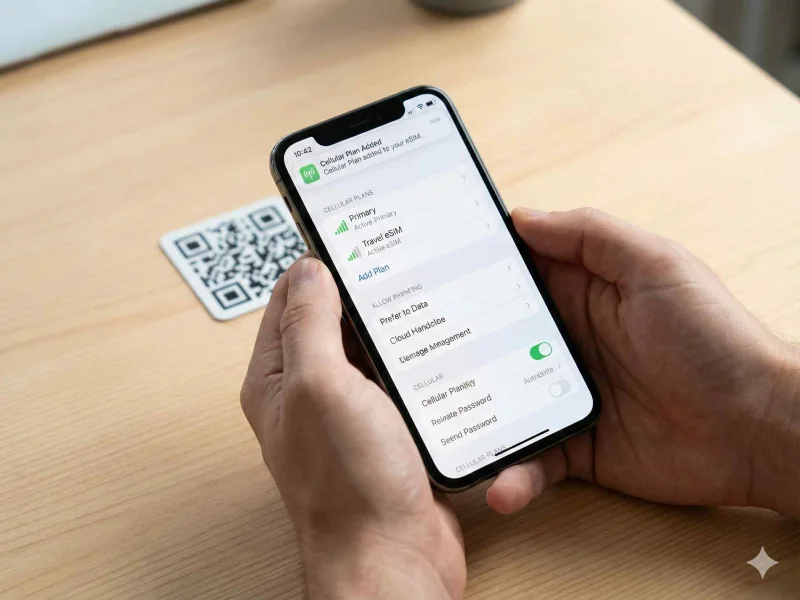
Unlock the convenience of an eSIM! Our easy guide walks you through installing eSIM on your iPhone and Android devices for seamless connectivity.
What is eSIM and How Does It Work?
Embedded SIM, or eSIM, represents a significant leap forward in mobile connectivity. Unlike traditional SIM cards, which are physical pieces of plastic that need to be inserted into your phone, an eSIM is a digital SIM embedded directly into your device. This revolutionary technology allows you to activate a cellular plan from your carrier without needing a physical SIM card. Instead, the eSIM is activated through software, providing a more flexible and versatile approach to mobile connectivity.
The eSIM technology operates through a process known as Remote SIM Provisioning. This means that you can download the eSIM profile directly to your device over the internet. When you want to switch carriers or add a new plan, you simply download the new profile to your eSIM, eliminating the need for waiting for a new physical SIM card to be delivered. This process is not only convenient but also incredibly fast, enabling users to switch between different networks and plans seamlessly.
Moreover, eSIMs are rewritable, meaning that the data on them can be erased and rewritten. This feature enables users to switch between different operators and plans without the hassle of handling multiple SIM cards. The eSIM technology is managed via software, making it possible to store multiple profiles on a single device. This capability is especially useful for frequent travelers who need to switch between different carriers in various countries, ensuring they can always stay connected.
Benefits of Using eSIM Technology
One of the most significant benefits of eSIM technology is its convenience. Unlike traditional SIM cards, which require you to physically remove and replace them whenever you want to change your network, eSIMs allow for instant switching between different carriers and plans. This ease of use is particularly advantageous for frequent travelers, who can quickly switch to a local carrier without having to search for a SIM card retailer or deal with the hassle of physically swapping cards.
Another major advantage is the space-saving aspect of eSIMs. Since eSIMs are embedded directly into the device, they eliminate the need for a physical SIM card slot. This allows manufacturers to design slimmer and more compact devices, or alternatively, use the extra space for other components like larger batteries or additional sensors. This technological advancement contributes to the ongoing trend of making devices more powerful and efficient without increasing their size.
Moreover, eSIMs offer enhanced security features compared to traditional SIM cards. Since eSIM profiles are downloaded directly to the device and managed through software, they are less susceptible to physical damage or theft. Additionally, the remote provisioning capability of eSIMs means that carriers can implement robust security measures to protect user data during the activation and switching processes. This added layer of security provides peace of mind for users, knowing their information is better protected.
Compatibility: Which Devices Support eSIM?
As eSIM technology continues to gain traction, an increasing number of devices are being designed to support it. Apple was one of the pioneers in adopting eSIM technology, with the iPhone XS, XS Max, and XR being among the first models to feature eSIM capability. Subsequent models, including the iPhone 11, 12, 13, and the latest iPhone 14 series, also support eSIM, making it a standard feature across Apple's recent lineup.
In the Android ecosystem, eSIM support is also expanding. Google's Pixel series, starting with the Pixel 2, has integrated eSIM functionality. The Pixel 3, 3a, 4, 4a, 5, and 6 series all support eSIM, showcasing Google's commitment to this technology. Other major manufacturers, such as Samsung, have also embraced eSIM. Devices like the Galaxy S20, S21, S22, and the Galaxy Note 20 series are equipped with eSIM capabilities, providing users with more flexibility and options.
Beyond smartphones, eSIM technology is also being incorporated into other connected devices. Tablets like the iPad Pro, iPad Air, and iPad Mini models with cellular capabilities support eSIM. Additionally, some smartwatches, such as the Apple Watch Series 3 and later, as well as the Samsung Galaxy Watch series, feature eSIM technology. As the adoption of eSIM continues to grow, we can expect to see even more devices across various categories supporting this innovative technology.
Step-by-Step Guide to Installing eSIM on iPhone
Installing an eSIM on your iPhone is a straightforward process, but it requires careful attention to detail. First, ensure that your iPhone is compatible with eSIM technology. Models from the iPhone XS onward support eSIM. Next, you'll need to have access to a Wi-Fi network, as the eSIM profile will be downloaded over the internet. Make sure your iPhone is updated to the latest version of iOS to ensure compatibility and access to the latest features.
To begin the installation process, you'll need to obtain an eSIM QR code from your carrier. This QR code contains the information required to download and activate your eSIM profile. Open the Settings app on your iPhone, navigate to "Cellular," and then tap on "Add Cellular Plan." Use your iPhone's camera to scan the QR code provided by your carrier. The device will recognize the QR code and prompt you to add the cellular plan.
After scanning the QR code, follow the on-screen instructions to complete the eSIM installation. You may be asked to enter a confirmation code, which your carrier should provide. Once the eSIM profile is downloaded and activated, you can manage your cellular plans directly from the "Cellular" settings. If you have multiple eSIM profiles, you can switch between them by selecting the desired plan. This seamless process ensures that you can stay connected without the need for physical SIM cards.
Step-by-Step Guide to Installing eSIM on Android Devices
Installing an eSIM on an Android device follows a similar process to that of an iPhone, but there are some differences depending on the device manufacturer and model. First, confirm that your Android device supports eSIM technology. Devices like the Google Pixel series and Samsung Galaxy models from the S20 series onward are compatible. Ensure your device is running the latest version of the Android operating system to access the most recent features and improvements.
To start the eSIM installation, you'll need a QR code from your carrier. Open the Settings app on your Android device and navigate to the "Network & Internet" or "Connections" section, depending on your device. Look for the "Mobile Network" or "SIM Card Manager" option, and select "Add Carrier" or "Add Mobile Plan." This will prompt your device to open the camera to scan the QR code. Scan the QR code provided by your carrier to initiate the eSIM profile download.
After scanning the QR code, follow the prompts to complete the installation. You may need to enter a confirmation code, which your carrier will provide. Once the eSIM profile is downloaded and activated, you can manage your mobile plans through the settings menu. If you have multiple eSIM profiles, you can switch between them easily by selecting the desired plan. This flexibility allows you to stay connected with minimal hassle, whether you're at home or traveling abroad.
Troubleshooting Common eSIM Installation Issues
While installing an eSIM is generally a smooth process, you might encounter some common issues along the way. One of the most frequent problems is an error message indicating that the eSIM profile could not be downloaded. This issue is often due to a weak or unstable internet connection. Ensure that your device is connected to a reliable Wi-Fi network and try the installation process again. If the problem persists, restarting your device can sometimes resolve connectivity issues.
Another common issue is the QR code not being recognized by your device. This can happen if the QR code is damaged or if the camera is not properly aligned with the code. Ensure that your camera lens is clean and try to scan the QR code in a well-lit environment. If the QR code is printed on paper, make sure it is not folded or creased. If you continue to experience issues, contact your carrier to request a new QR code or additional assistance.
Occasionally, you may encounter problems with activating the eSIM profile after it has been downloaded. This can be due to network issues or an incorrect confirmation code. Double-check the confirmation code provided by your carrier and ensure that you have entered it correctly. If activation issues persist, contact your carrier's customer support for further assistance. They can help troubleshoot the problem and ensure that your eSIM is activated successfully.
Managing eSIM Profiles on Your Device
One of the key advantages of eSIM technology is the ability to manage multiple profiles on a single device. This is particularly useful for individuals who need to switch between different carriers or plans frequently. To manage your eSIM profiles on an iPhone, navigate to the "Cellular" section in the Settings app. Here, you will see a list of all the eSIM profiles installed on your device. You can label each profile for easy identification and select which one you want to use as your primary plan.
On Android devices, managing eSIM profiles can be done through the "Network & Internet" or "Connections" section in the Settings app. Select "Mobile Network" or "SIM Card Manager" to view and manage your eSIM profiles. You can switch between different profiles by selecting the desired plan. This feature is particularly beneficial for travelers who need to use different carriers in various countries. By having multiple profiles on a single device, you can switch networks without the need for physical SIM cards.
Additionally, some devices allow you to set preferences for data usage, voice calls, and text messages for each eSIM profile. This ensures that you can manage your connectivity based on your needs and preferences. For example, you can set one profile for voice calls and another for data usage, optimizing your plans for cost and convenience. This level of flexibility and control over your mobile connectivity is one of the standout features of eSIM technology.
Switching Carriers with eSIM: What You Need to Know
Switching carriers with an eSIM is a straightforward process, but there are a few important considerations to keep in mind. First, ensure that your device is unlocked and compatible with the new carrier's network. If your device is locked to a specific carrier, you will need to contact them to request an unlock before you can switch to a new network. Once your device is unlocked, you can proceed with the eSIM installation for the new carrier.
To switch carriers, you will need to obtain a new eSIM profile from your desired carrier. This typically involves purchasing a plan and receiving a QR code to download the eSIM profile. Follow the same installation process as before: open the settings app on your device, navigate to the appropriate section, and scan the QR code. Once the new eSIM profile is downloaded and activated, you can switch to the new carrier's network.
It's important to note that while eSIM technology makes switching carriers easier, there may still be some limitations based on your carrier and region. Some carriers may have specific policies or restrictions regarding eSIM usage and switching. Additionally, not all carriers support eSIM technology yet, so it's important to verify compatibility before making the switch. By staying informed and following the necessary steps, you can take full advantage of the flexibility and convenience that eSIM technology offers.
Security Features of eSIM Technology
eSIM technology offers several enhanced security features compared to traditional SIM cards. One of the primary security benefits is the reduced risk of physical theft or damage. Since eSIMs are embedded directly into the device and managed through software, there is no physical card that can be lost or stolen. This adds an extra layer of security, ensuring that your mobile connectivity remains intact even if your device is lost or damaged.
Another significant security feature of eSIM technology is the remote provisioning process. When you download an eSIM profile, the data is transferred securely over the internet, and carriers can implement robust encryption and authentication measures to protect your information. This ensures that your eSIM profile is securely downloaded and activated, reducing the risk of unauthorized access or tampering.
Additionally, eSIM technology allows for better control and management of your mobile connectivity. You can easily switch profiles or deactivate an eSIM if you suspect any security issues. This level of control is particularly important in today's digital landscape, where data security is a top priority. By leveraging the security features of eSIM technology, you can enjoy peace of mind knowing that your mobile connectivity is protected.
Conclusion and Future of eSIM in Mobile Technology
The adoption of eSIM technology marks a significant milestone in the evolution of mobile connectivity. With its convenience, flexibility, and enhanced security features, eSIM is set to revolutionize how we connect to mobile networks. The ability to switch carriers and manage multiple profiles seamlessly provides users with unprecedented control over their mobile plans. As more devices and carriers embrace eSIM technology, we can expect to see even greater advancements in the mobile industry.
Looking ahead, the future of eSIM technology is promising. As 5G networks continue to expand, the demand for flexible and efficient connectivity solutions will only increase. eSIM technology is well-positioned to meet this demand, offering users the ability to switch between different 5G networks and take full advantage of the high-speed connectivity. Moreover, the integration of eSIM into a wider range of devices, including wearables, tablets, and IoT devices, will further drive its adoption.
In conclusion, eSIM technology represents a transformative shift in mobile connectivity. By eliminating the need for physical SIM cards and providing users with greater flexibility and security, eSIM is paving the way for a more connected and convenient future. Whether you're a frequent traveler, a tech enthusiast, or simply someone looking for a hassle-free mobile experience, eSIM technology offers numerous benefits that are set to shape the future of mobile connectivity. Embrace the convenience of eSIM and unlock the full potential of your mobile device.




Comments